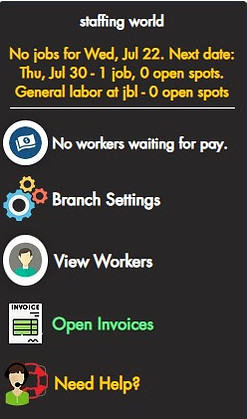
Your Dashboard Snapshot — See What Every Feature Does
Before you dive into your live dashboard, explore each function in detail. From clock-in tools to worker approvals and code generation, this guide explains every capability so you can make the most of Constructly from day one.
Customize Your Operations Seamlessly
In the settings panel, you have full control over your workflow. Define check-in times, and configure wage rates—whether standard or night pay. Track your tool inventory and manage your equipment effortlessly. Plus, export payroll data to systems like Staffing Complete, ensuring smooth integration with your preferred platforms.

5:30AM


Ditch the tickets and send your clients invitations in seconds.
Sending invites is fast and easy. Enter your name, along with the recipient's name and email, then send.

Generate Daily Clock In Code
Each morning, generate a unique check-in code and display it in a visible location where all workers can easily access it.

Workers Clock In Digitally—No More Paper, No More Hassle
To start, workers head to grabajob.net, create a free account, and complete a quick profile with basic information like their name, phone number, trade, and transportation status. Once approved by the staffing agency, they can begin receiving job offers directly on their phone, clock in digitally at the job site, view directions, track hours, and stay connected with the agency and field manager all in one place.

Approve Workers for Your Team
In this panel, you’ll see pending workers who need approval. Review their details and confirm each one to ensure only the right workers are available for assignments.


Assign Labor Quickly and Confidently
Watch the step-by-step video and see how easy it is to assign the right workers in seconds. You can view past reviews to ensure you’re sending the best fit—whether it’s a new job or a repeat order. The system streamlines everything, so you can confidently place reliable workers fast and efficiently.

Assign Labor In Seconds
Help Is Just a Click Away
Whenever you’re stuck or have a question, just hit the "Help" button on the sidebar. We’ve got on-the-spot assistance ready, so you’re never left figuring things out alone.